 GitHub Release
8 real listings · checked July 23, 2026
Paralives Mods
Download verified Paralives plugins from their creator repositories or open the original Steam Workshop item. Every listing names the mod, author, source and latest version or update date we could confirm.
8verified listings
5direct creator files
3Workshop items
Browse verified mods
Browse
Download real Paralives mods
These are specific, verified projects rather than generic platform links. GitHub buttons lead to the creator release file; Steam buttons lead to the exact Workshop item for subscription.
GitHub Release
 GitHub Release
GameplayUpdated Jun 8, 2026
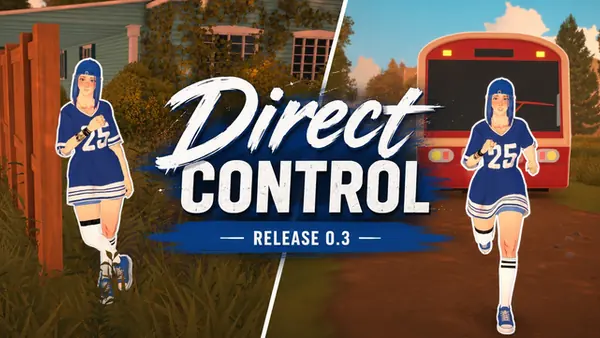
Direct Control
Adds WASD character movement, a third-person camera, rebindable controls, sprinting and smoother collision.
- Author
- Rockz
- Version
- 0.3.2
Save protectionUpdated Jul 5, 2026
Safer Saves
Writes saves safely, keeps five backups, validates save data and offers recovery when a damaged save is detected.
- Author
- 6ix
- Version
- 1.0.2
Loading fixUpdated Jul 6, 2026
FixMyReimport
Prevents endless asset reimport loading, skips broken items and protects Workshop files during Steam connection failures.
- Author
- 6ix
- Version
- 2.2.1
PerformanceUpdated Jun 20, 2026
Paralives Optimisation
Adds expanded video settings and allocation-conscious performance patches, with options for resolution scaling and effects.
- Author
- 6ix
- Version
- 0.3.2
 Steam Workshop
CameraUpdated May 25, 2026
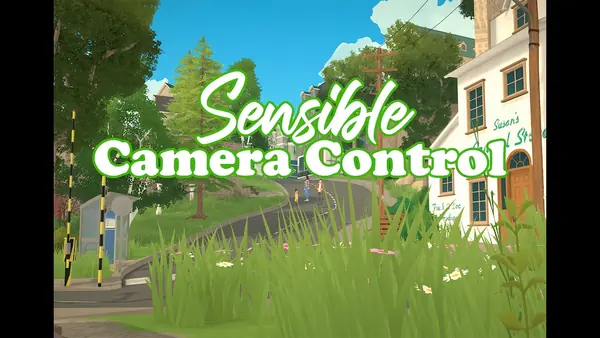
Sensible Camera Control
Removes automatic camera tilt and other angle constraints so the view changes only when the player controls it.
- Author
- TwistedMexi
- Updated
- Updated May 25, 2026
 Steam Workshop
CameraUpdated May 30, 2026
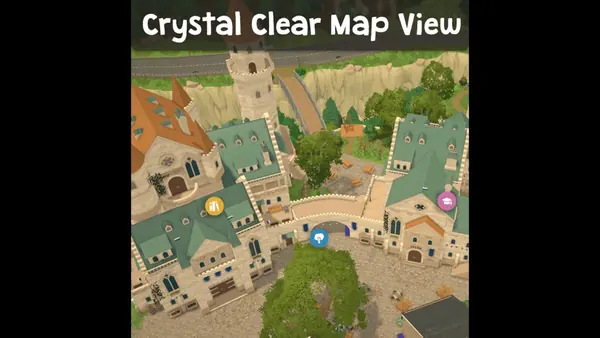
Crystal Clear Map View
Removes depth of field and color lookup filters from the town map for a clearer overview.
- Author
- Arro
- Updated
- Updated May 30, 2026
 Steam Workshop
BuildingUpdated Feb 27, 2026
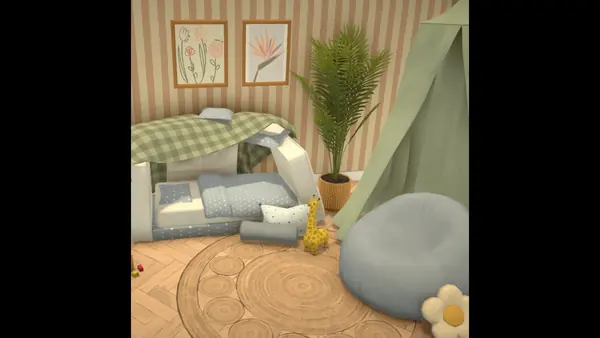
Kidi Furniture Items
Adds a coordinated children's-room set with a pillow-fort bed, bench, bean bag and canopy.
- Author
- ChloeParalives
- Updated
- Updated Feb 27, 2026
No matching mod
Clear a filter or try a broader term such as gameplay, fixes, camera or building.
Install and repair
Start with the right Paralives mod workflow
Workshop subscriptions and externally downloaded files are not the same workflow. Pick the path that matches where your mod came from before moving folders or deleting files.
How to install Paralives modsChoose the correct process for Workshop and external sources.
Steam Workshop modsSubscribe, enable, update and unsubscribe through Steam.
Mods not showingFix discovery, menu and build-mode visibility problems.
Mods not workingIsolate outdated dependencies and post-update failures.
Paralives cheatsOpen the built-in console and use verified money, needs and skill commands.
Paralives system requirementsCompare official minimum and recommended specs before installing the game or adding mods.
Paralives modding guideMake a small furniture or clothing mod, test it and prepare a Workshop release.
Paralives character creationUse Paramaker to shape a Parafolk, browse filters and test the look in live mode.
Paralives save folderFind the Windows save location and back up a known-good copy before mods or updates.
Paralives gameplay modsCompare verified traits, movement and control changes before adding gameplay files.
How this directory works
A safer way to find and download Paralives mods
Paralives mods can come from more than one distribution route. A Steam Workshop item stays attached to your Steam subscription, while a DLL published through a creator's GitHub repository needs the installation steps and dependencies named by that project. Treating every download as the same kind of file is one of the fastest ways to create duplicate installs, outdated copies or a mod that appears in one menu but not another.
Paralives Mods is designed as a verified directory rather than an anonymous mirror. The catalog records the real project name, author, source, version or update date and the acquisition method. Direct buttons use the original GitHub release or repository file. Workshop buttons open the exact item ID in Steam, where subscription ownership, updates and removal remain under the creator's listing.
The game is in Early Access, so a useful mod listing must be honest about change. We do not label a mod compatible merely because its page exists. Compatibility should be tied to a stated game build, a recent creator update or a repeatable test. If that evidence is missing, the correct label is unknown, not verified. Back up saves before testing script mods or large gameplay changes.
Choose a source before you choose a file
GitHub Releases are useful when a creator publishes a versioned binary with a release history and repository documentation. A raw repository file can also be legitimate when the manifest records its filename, size and SHA-256. Steam Workshop is the correct route when the creator distributes an item through a subscription and expects Steam to manage updates.
Avoid download pages that hide the filename, replace the creator name, force an executable for ordinary custom content or claim to provide a cracked copy of the game. Mods should extend a legally obtained installation. This site does not host pirated Paralives builds, adult downloads, stolen creator packs or unknown installers.
- Open the original description and read requirements before downloading.
- Check the file date against the game update that changed your setup.
- Keep only one installed copy when the same mod is available from several sources.
- Record which mods affect saves, scripts or build objects before testing a new collection.
Why building mods and custom content need separate filters
A user looking for easier placement, even floor tiles or multiple-selection controls has a build-mode problem. Someone looking for hair, clothes or nails has a Paramaker custom-content problem. Mixing both into one endless list makes it harder to spot dependencies and harder to diagnose why an item is missing. The Building and Custom Content hubs preserve that distinction while still linking back to installation and troubleshooting guidance.
The same principle applies to fixes. “Not showing” means the game does not list or display the item where expected. “Not working” means the game recognizes it but the feature fails, throws an error or breaks after an update. Separate guides help users start with the right checks instead of deleting all mods immediately.
What a trustworthy mod detail should show
A complete detail page should name the author, original source, file version, last update, expected game version, dependencies, install path and known issues. Screenshots should show the actual object, hair, clothing or gameplay change rather than generic game artwork. If a file is hosted with permission, the listing should also record a hash and the date the hosted copy was checked. Download counts and ratings should never be invented.
The current catalog contains eight specific projects checked on July 23, 2026. Five GitHub listings point to their creator-hosted DLL files, while three Workshop listings preserve the original Steam item IDs. The files are not copied into this repository, and a Workshop subscription is never presented as a standalone file download.
Use the Paralives Mods directory for repeat visits
Use the Paralives Mods directory when you want to compare verified projects before downloading. The source filter separates creator-hosted GitHub files from Workshop subscriptions, while the category filter keeps gameplay, fixes, performance, camera and building content distinct. This makes it easier to return to the same project after a game update instead of searching from the beginning.
Use the Paralives Mods directory again after installing a file to reach the matching install or repair guide. A missing object should lead to visibility checks; a detected feature that fails should lead to compatibility checks. Keeping discovery and diagnosis in the same directory reduces random folder changes and preserves the original creator link for future updates.
Help desk
Paralives mods FAQ
Quick answers to the questions that most often appear before or after a mod download.
Does Paralives have mods?
Yes. This catalog currently verifies creator-published GitHub plugins and individual Steam Workshop items for Paralives. Availability and compatibility vary by project, so read the original creator notes before installing.
How do I download mods for Paralives?
Choose a legitimate source, read its requirements and use the workflow for that source. Workshop items are subscribed to through Steam; externally downloaded files may require manual placement. Follow the install guide rather than assuming both methods use the same folder.
Where is the Paralives mods folder?
The exact path can depend on platform and the mod framework or source. Do not create random nested folders from an unverified path. Use the installation instructions supplied by the creator and confirm that your archive was extracted correctly.
Why are my Paralives mods not showing up?
Common causes include an incomplete Workshop download, a disabled mod setting, the wrong folder level, an archive that was not extracted, a missing dependency or content that appears only in a specific game mode. Use the symptom-first not-showing checklist.
Do I need to restart Paralives after installing mods?
Yes, restart the game after changing installed files or Workshop subscriptions so the mod discovery process can run from a clean launch. If Steam is still downloading an item, wait for it to finish before reopening the game.
Is this site affiliated with the mod authors or Paralives Studio?
No. Paralives Mods is an independent fan-made directory. Steam, GitHub, Paralives and creator names remain the property of their respective owners. Every file or subscription button points to the recorded original source.